Actions
Know exactly what to change.
“Improve your SEO” isn't an instruction anyone can act on. A specific page, a specific fix, and a specific way to check it later — that is.
Example fix
Standardize the product name across the pricing and homepage.
Location
The exact page or field to change, so nobody has to go hunting for it.
Guidance
Step-by-step instructions, written against the evidence that flagged the problem.
Evidence
The finding and supporting evidence that produced this action, linked and ready to review.
Acceptance check
A plain-language line in the sand: here is what has to be true for this to count as fixed.
The short version
Every action names the exact page,
the exact fix, and how we'll check it.
See it live
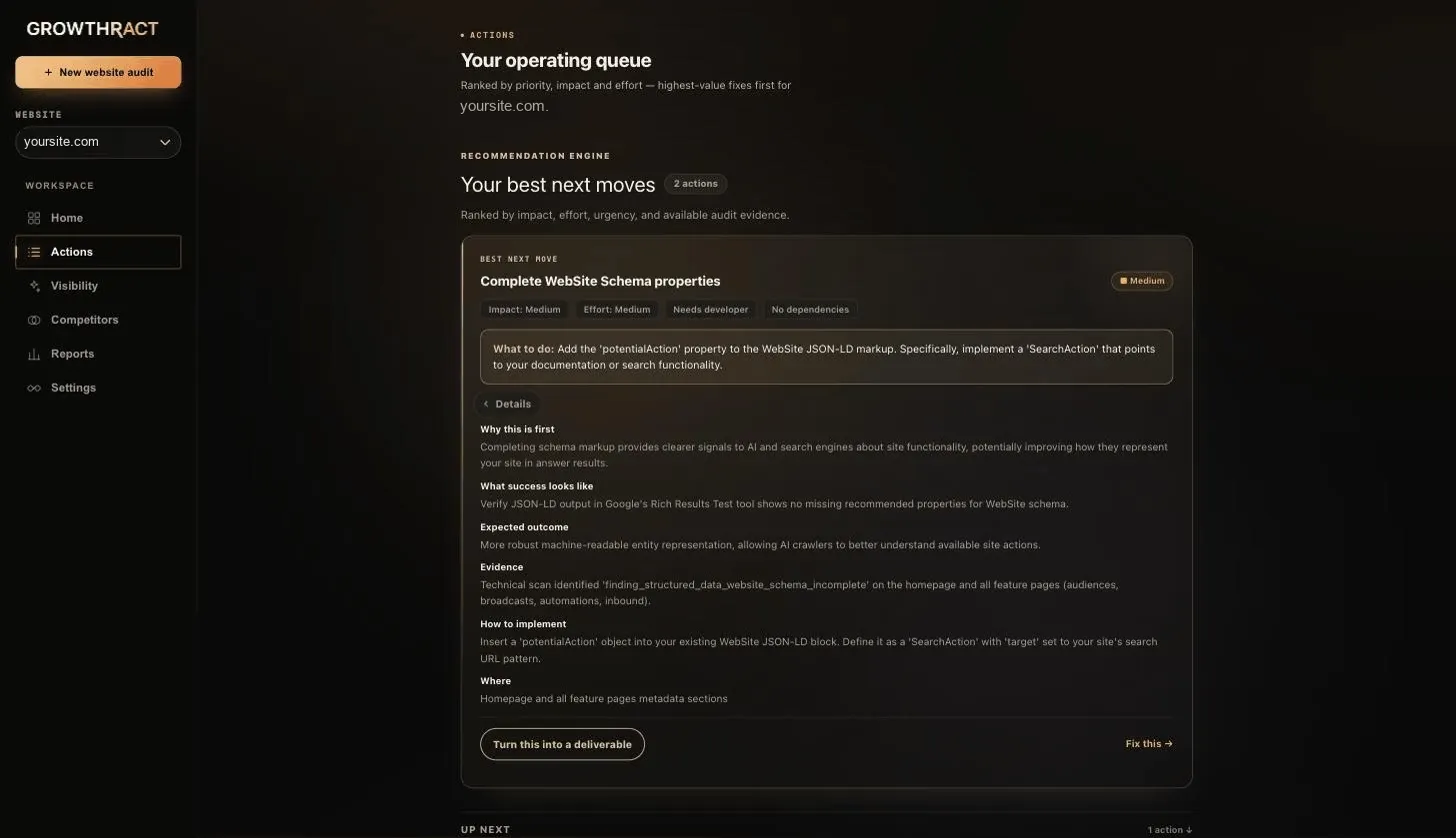
Your operating queue, for real.
Ranked by priority, impact and effort — this is the actual queue, not a staged screenshot.
From recommendation to fix
A recommendation names a problem. An action tells you how to fix it.
Every action carries the context needed to actually make the change: the specific location in your site or codebase, implementation guidance, the reasoning behind it, and the acceptance check that will later confirm whether it worked.
Location
The specific page, template or field the change applies to, not a general area of the site.
Guidance
Concrete implementation guidance for making the change, written against the evidence that produced it.
Acceptance check
A defined condition — an absent finding, a passing readiness check, or changed public-web evidence — that a later scan can evaluate.
Dependencies
Actions that depend on other work stay ordered instead of competing for attention at the same time.
Who makes the change
You implement it. Growthract tracks it.
Marking an action implemented records that you made the change. Growthract does not edit your website or your codebase, and it does not deploy anything on your behalf.
What Growthract does
Surfaces the action, keeps it connected to evidence, and re-checks the defined acceptance condition on your next comparable scan.
What you do
Make the actual change in your site, CMS or codebase, then mark the action implemented so it is included in the next verification pass.
Truth boundary
Marked implemented is not the same as verified.
Evidence boundary
Continue through the system
Prioritization
Recommendation Engine
Turn a larger set of findings into a focused Best Next Move using evidence, impact, effort, business relevance and dependencies.
Verification
Verification
Separate implementation from verification and use later comparable evidence to determine whether defined acceptance conditions actually changed.
Technical Evidence
Website Audits
Inspect crawlability, indexability, structured data and page-level signals with deterministic checks wherever deterministic answers are possible.
See what Growthract already knows about your website.
No setup marathon. Point it at your site and see what is already there.